


How to Export Searches or Projects on LinkedIn Recruiter and Recruiter Lite

If you’re reading this article, you probably know the power of LinkedIn Recruiter and Recruiter Lite’s search abilities. While the software is great for finding candidates, how do we export searches from Linkedin Recruiter?
Since Linkedin doesn’t allow any kind of export, you’ll need the Wiza Chrome Extension to get this done. Wiza was built entirely for this purpose.
Getting this data fast is crucial to being able to reach out to a large number of candidates and generate opportunities.
So how do you extract email addresses from LinkedIn Recruiter?
In this article, we share the 3 steps to instantly export people from a LinkedIn Recruiter search. This will also work with Linkedin Recruiter Projects. It’s all with our LinkedIn Recruiter extractor.
How to Export Leads from LinkedIn Recruiter in 3 Steps
Step One: Create your search with the people you want to extract.
As you normally would, create your search on LinkedIn Recruiter. In this example, we’re looking for Operations Managers in the United States.
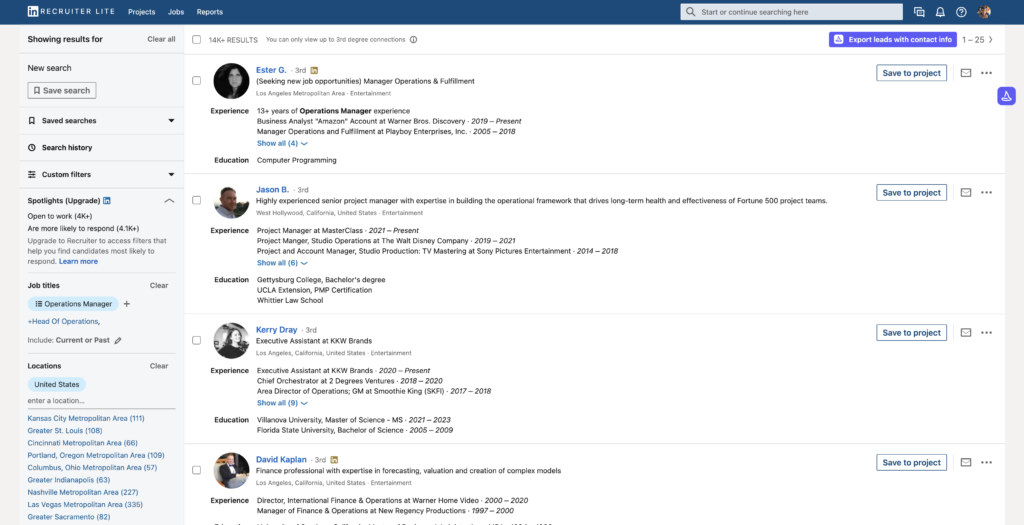
As you can see, we have thousands of candidates. A search that size would take us hours if we had to manually go through these and try to find their contact information.
Step Two: Run Wiza.
The next step is to sign up for a free account at Wiza.
After you’ve signed up and downloaded the extension, you will see this button:

After you click the button, you’re brought to the Wiza Dashboard to decide on how much of the search you want to export, what kind of emails you’re looking for, and you can name your list. In our case, I’m looking for personal emails only, and I’ll scrape the entire list.

Now, Wiza will get to work.

What is Wiza doing at this point? Our platform is going through your list and first scraping each individual contact, then putting them all into a spreadsheet for you. This is returned as the “All” document that you can download. Then, Wiza will look at the company names of the people in your search and search all over the web to try and find your contact’s email address. This can include their work, personal, or generic company email, it’s up to you! Wiza can also find the phone numbers of your candidates.
Guaranteed Deliverability
Not only will Wiza find the correct email, it will also verify that the inbox can receive mail. This stops you from getting bounced emails like other tools. Wiza pings the email address to ensure that the email is still active and working.
If it’s deliverable, it will return to you as a “valid email” with Wiza.
If it can’t be verified because their domain has an “accept-all” status, we’ll give you that email for free and mark it as a “risky” email. If the verification tells us it’s an invalid email, we’ll let you know we couldn’t find that email, you aren’t charged for these contacts either.
What are the 3 email categories?
Valid Emails: These are emails that Wiza found and was able to verify, these emails will never bounce.
Risky: These are emails that Wiza found but wasn’t able to 100% verify. We recommend mixing these into your outreach still, more on that here.
All: These are all the people in your search, in an easy-to-use .csv file format, you can easily import all the contacts wherever you need them.
Step 3: Download Your Results. You’ve now exported your leads from Linkedin Recruiter!
And we’re done, Wiza has gotten us all our results in just a few minutes, while also finding email addresses and phone numbers.

Wiza is extremely powerful because you can export all sizes of Linkedin Searches and Projects. Wiza can export up to 2,500 contacts per export, and there’s no limit on the number of exports that can be performed. You can be confident that the email data you receive from Wiza is accurate thanks to our real-time email verification. This is the power of combining LinkedIn Recruiter with Wiza.
What Data Can I Export From LinkedIn Recruiter?
Any data displayed on each person’s profile and company page could be exported from Sales Navigator.
The exportable data includes but is not limited to the following:
- First and Last Name of the person
- Work, Personal, and Generic Email
- Phone number
- Profile URL
- Company Page URL
- Job title
- Location
- Number of employees at company
- And much more
All of these exportable pieces of data could be integrated into your CRM of your choice to improve project collaboration and outreach workflows. Wiza’s LinkedIn Prospecting Tool does the job so you don’t have to do any manual work on spreadsheets.
How Do I Export a Project List From Recruiter?
If you’ve already got a list of handpicked candidates and you want to export that instead of doing a search, we can help you do that, too.
First, you’d go to Recruiter and open your project of choice.
You’ll see the exact same ‘Export Leads with Contact Information’ button – clicking that will allow you to export the project just like a search!
You’re done!
Congratulations, you can now export hundreds and hundreds of leads off LinkedIn Recruiter thanks to Wiza! Once again, you can get signed up with Wiza.
Questions? Concerns? Reach out to our live chat on our website or email us at hello@wiza.co


Create prospect lists from Linkedin.
Convert any Linkedin search to an email list ready for outreach.


